
From media to shared memory
An app that understands the moments behind your photos.

Bring together your photos and the details of what happened. LivePost connects them into memories you can explore through conversation—and helps you turn those memories into stories to keep and share.
Shared links open in a browser — no app needed to view.

See an example
One day out. A story to come back to.
A hike at Snow Lake becomes more than a set of photos: a moment to understand, build on together, and return to through conversation.
-
1
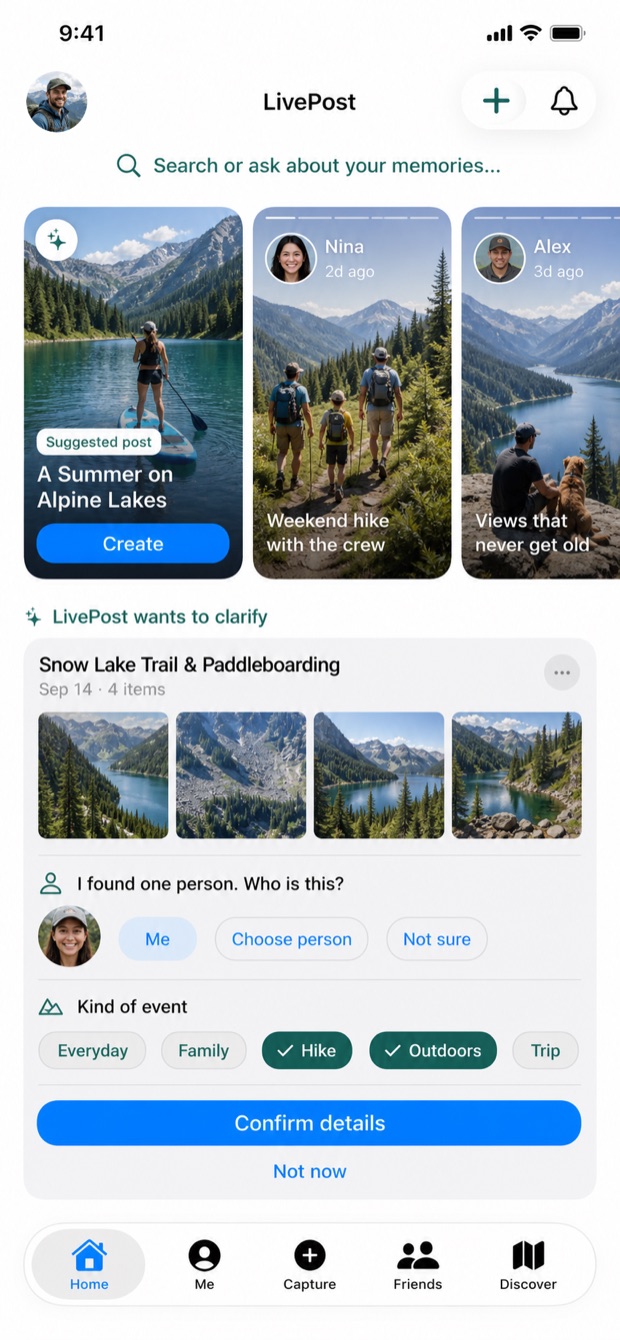
LivePost finds a moment
LivePost finds moments in your photos and videos and suggests them to you. Once you save one, it helps you fill in who was there and what happened.
-
2
Build it together
Share a link and invite others to contribute photos and videos from the same event. Review their additions to grow your collection and the story you share.

-
3
Ask your memories
LivePost learns who was there, where you went, and what happened. Come back anytime to ask questions or create a story from those memories.


The story can grow. When contributions are enabled, people you share with can suggest their photos and videos. You choose which additions appear.
Ask your memories—even years later. LivePost brings the story back.
Illustrative demo memories shown in the app.
Why LivePost
Keep more of what made it matter.
-
Remember the details
Keep who was there, where you went, and what happened alongside your photos and videos.
-
Bring everyone's story together
Your photos are one part of the day. Invite family and friends to suggest theirs for the same LivePost.
-
Find your way back
Ask about a place, a trip, or a summer. Return to the memories behind the answer.
Your memories. Your choice.
Start for yourself.
Share when you're ready.
- What do I use the app for?
- Gather your photos and details, ask questions about your memories, and create stories to keep or share. You can start on your own.
- Do my family and friends need the app?
- They can view a LivePost with an unrestricted link in their browser, without installing the app or creating an account. Restricted links require sign-in and access.
- Who can see my memories?
- Memories you save start private. When you create a LivePost, you choose how to share it. Anyone with an unrestricted link can view the shared story.
- Can others add their photos?
- If you allow contributions, viewers can suggest photos for your LivePost. Suggestions appear in the story only after you or a co-owner accepts them.